- StingyBasilisk has been active since April 2022.
- The threat group uses uncommon persistence techniques on compromised hosts: COM hijacking and time providers.
- Malware in the group's arsenal: SilentCOM, TediousLoader, and CunningDoor.
Author

Daniil Grigoryan
Lead Specialist, Comprehensive Incident Response Department
Key takeaways
Introduction
In early 2026, the PT ESC incident investigation and response team (PT ESC IR) discovered a sophisticated threat from a group we named StingyBasilisk, which has been active since at least April 2022. The attackers maintained control of the compromised infrastructure for an extended period, operating covertly and disguising their tools as legitimate security software used by the organization.
Although we could not determine the initial infection vector, we uncovered an extensive network of custom attacker-controlled agents managed through Windows named pipes. The StingyBasilisk APT group used a wide range of techniques to conceal its presence, suggesting that espionage was the attack's ultimate objective. To maintain persistence on compromised hosts, the attackers used COM hijacking to launch SilentCOM and time providers to run TediousLoader. They used SMB for lateral movement and Windows Task Scheduler for remote execution. Starting in February 2026, StingyBasilisk used this approach to deploy the CunningDoor loader. All malware samples we discovered were DLLs designed to wait for payloads and execute them in the memory of a Windows process.
We suspect that the attackers have a custom command-and-control (C2) framework whose payloads consist of shellcode that resides only in memory on Windows systems. This framework may support C2 communication through either named pipes or network connections to arbitrary addresses. StingyBasilisk also uses native Windows raw sockets to capture and analyze network traffic on compromised hosts to obtain C2 server addresses. The group's name reflects its extensive use of named pipes for C2 communication and the difficulty of detecting its payloads.
At present, we have no information that would allow us to reliably attribute the attack to any previously known APT group.
Lateral movement
In February 2026, the attackers began actively moving laterally through the compromised infrastructure to expand their presence.
They used SMB to transfer malware to specific directories on target hosts. To execute it, they used atexec, a tool in the Impacket suite that supports remote command execution through Windows Task Scheduler. The tool connected to the target host over SMB and opened the named pipe \pipe\atsvc, then used MS-RPC to create and immediately run a scheduled task. It launched the task with arguments by calling the SchRpcRun method (Opnum 12) of the ITaskSchedulerService interface. In every observed instance, the task name matched the pattern [0-9A-Fa-f]{8}-[0-9A-Fa-f]{4}-[0-9A-Fa-f]{4}-[0-9A-Fa-f]{4}-[0-9A-Fa-f]{12}, differing from the default naming format used by the Impacket script.
{
    "Event": {
        "EventData": {
            "Name": "TaskRegisteredEvent",
            "TaskName": "\\11BBA9EF-3528-C48C-2221-D0D4DD92D971",
            "UserContext": "[REDACTED]"
        },
        "System": {
            "Channel": "Microsoft-Windows-TaskScheduler/Operational",
            "Computer": "[REDACTED]",
            "Correlation": {
                "ActivityID": "9F2B3873-3333-0000-C834-338FB383D123"
            },
            "EventID": "106",
            "EventRecordID": "104611",
            "Execution": {
                "ProcessID": "916",
                "ThreadID": "6132"
            },
            "Keywords": "0x8000000000000000",
            "Level": "4",
            "Opcode": "0",
            "Provider": {
                "Guid": "DE7B24EA-73C8-4A09-985D-5BDADCFA9017",
                "Name": "Microsoft-Windows-TaskScheduler"
            },
            "Security": {
                "UserID": "S-1-5-18"
            },
            "Task": "106",
            "TimeCreated": {
                "SystemTime": "2026-02-12T13:38:28.7233228Z"
            },
            "Version": "0"
        }
    }
}
At this stage, the attackers began actively using CunningDoor with the following launch arguments:
{
    "Event": {
        "EventData": {
            "CommandLine": "C:\\Windows\\System32\\rundll32.exe IKEYUI64.dll,ikeyUI_DlgSelectDeviceA",
            "NewProcessId": "0x00003008",
            "NewProcessName": "C:\\Windows\\System32\\rundll32.exe",
            "ProcessId": "0x00000394",
            "SubjectDomainName": "[REDACTED]",
            "SubjectLogonId": "0x000003e7",
            "SubjectUserName": "[REDACTED]",
            "SubjectUserSid": "S-1-5-18",
            "TokenElevationType": "%%1936"
        },
        "System": {
            "Channel": "Security",
            "Computer": "[REDACTED]",
            "Correlation": {},
            "EventID": "4688",
            "EventRecordID": "28348842",
            "Execution": {
                "ProcessID": "4",
                "ThreadID": "10332"
            },
            "Keywords": "0x8020000000000000",
            "Level": "0",
            "Opcode": "0",
            "Provider": {
                "Guid": "54849625-5478-4994-A5BA-3E3B0328C30D",
                "Name": "Microsoft-Windows-Security-Auditing"
            },
            "Security": {},
            "Task": "13312",
            "TimeCreated": {
                "SystemTime": "2026-02-12T13:38:28.8346135Z"
            },
            "Version": "1"
        }
    }
}
By leveraging legitimate SMB functionality, the attackers could execute commands on remote systems without interactive access and efficiently distribute payloads across the corporate network.
Persistence
To maintain persistence on compromised Windows hosts, the attackers used two relatively uncommon techniques: Component Object Model (COM) hijacking and time providers.
COM hijacking
The attackers used COM hijacking to target the following COM objects:
- Network List Manager, with CLSID {DCB00C01-570F-4A9B-8D69-199FDBA5723B}. This object manages network profiles and is widely used by system services and applications. It is accessed during operating system startup, network connection changes, and network diagnostics.
- Network Configuration, with CLSID {5b035261-40f9-11d1-aaec-00805fc1270e}. The operating system and third-party software use this object to configure network adapters.
The attackers implemented this technique by modifying the TreatAs registry key, which was originally designed to support compatibility between COM objects. They modified HKLM\Software\Classes\CLSID\{DCB00C01-570F-4A9B-8D69-199FDBA5723B}\TreatAs, setting its default value to the CLSID of their own malicious COM object. As a result, whenever a process accessed Network List Manager or Network Configuration, the system transparently redirected the call and loaded a malicious DLL from a location such as %systemroot%\system32\netprofmprox.dll. This filename closely resembles that of the legitimate library, netprofm.dll.
The COM object inventory module in the PT Dumper utility is shown below:
{
    "TimeLine": "2023-04-06T08:23:10Z",
    "OriginalCOM": {
        "TimeLine": "2023-04-06T08:23:10Z",
        "ModuleName": "",
        "CLSID": "{DCB00C01-570F-4A9B-8D69-199FDBA5723B}",
        "HivePath": "Windows\\System32\\Config\\SOFTWARE:Classes\\CLSID",
        "Description": "NetworkListManager",
        "TypeLib": "{DCB00D01-570F-4A9B-8D69-199FDBA5723B}",
        "Version": "1.0",
        "Treat": true,
        "TreatAs": "{EDC98819-728F-4166-9E89-EFAFE7855300}"
    },
    "TreatCOM": [
        {
            "TimeLine": "2023-04-06T08:22:59Z",
            "ModuleName": "",
            "CLSID": "{EDC98819-728F-4166-9E89-EFAFE7855300}",
            "HivePath": "Windows\\System32\\Config\\SOFTWARE:Classes\\CLSID",
            "Description": "Network Configuration Component Object",
            "Treat": false,
            "COMServers": [
                {
                    "Type": "InprocServer32",
                    "FilePath": "%systemroot%\\system32\\netprofmprox.dll",
                    "ThreadingModel": "Both"
                }
            ]
        }
    ]
}
To remain undetected, the replacement library netprofmprox.dll functions as a fully functional COM server: it exports DllGetClassObject(), DllCanUnloadNow(), DllRegisterServer(), and DllUnregisterServer(), and its class factory creates objects with the expected interfaces, including INetworkListManager. This prevents crashes in calling processes that could reveal the presence of malicious code.
Time Providers
At each system startup, the Windows Time service (W32Time) automatically loads libraries registered under HKLM\SYSTEM\CurrentControlSet\Services\W32Time\TimeProviders. The attackers registered their own time provider under this key, set the DllName value to the path of a malicious DLL, and set Enabled to 1.
As a result, when the operating system started, W32Time loaded the specified library into an svchost.exe process running as Local System, providing reliable, stealthy persistence.
Output from PT Dumper's autostart module:
{
    "Content": "ControlSet001\\Services\\W32Time\\TimeProviders\\HyperV\\DllName: c:\\windows\\system32\\wgtdgr.dll",
    "Hive": "SYSTEM",
    "KeyName": "ControlSet001\\Services\\W32Time\\TimeProviders\\HyperV",
    "TimeLine": "2025-12-16T17:08:53Z",
    "UserName": "",
    "ValueData": "c:\\windows\\system32\\wgtdgr.dll",
    "ValueName": "DllName",
}
To load successfully, the library must export the TimeProvOpen() function, which W32Time calls when initializing the provider. This function serves as an entry point and must match the signature expected by the Windows Time service. Attackers typically use it to launch the main payload.
TediousLoader
The malicious code in the DLL registered under TimeProviders is implemented in the exported TimeProvOpen function. This callback is invoked by the time provider manager when the W32Time service loads the DLL.
The DLL captures network traffic through the Winsock API, using native Windows capabilities without requiring third-party libraries. The malware monitors all network interfaces and inspects incoming IP packets for a command concealed in the packet payload, identifying it by a magic signature. It then uses the command's fields to configure a network channel through connect, bind, and listen calls. Through this channel, it receives additional code, decrypts it, and executes it in a separate thread.
To set up a raw socket listener on a network interface, the malware performs the following steps:
- Enumerates all network adapters (such as Ethernet, Wi-Fi, VPN) using GetAdaptersAddresses.
- Creates a raw socket for each adapter:
socket(AF_INET, SOCK_RAW, 0); - Binds the socket to the adapter's first unicast IP address, ignoring any additional addresses. This allows it to capture traffic destined for that interface:
bind(s_1, lpSockaddr, iSockaddrLength); - Enables promiscuous mode and sets the socket to nonblocking mode:
WSAIoctl(s, 0x98000001, &vInBuffer, 4u, 0, 0, &cbBytesReturned, 0, 0);
ioctlsocket(s, 0x8004667E, &argp);
Here, SIO_RCVALL (0x98000001) enables reception of all packets, while FIONBIO (0x8004667E) sets nonblocking mode. This is the key step that enables the malware to capture all traffic passing through the adapter.
The sniffer then enters an infinite loop, checking all open raw sockets for incoming data at five-second intervals. It builds an fd_set structure (a set of socket descriptors) containing all unique sockets, up to a maximum of 64. The select() function blocks execution for up to five seconds, waiting for at least one socket to have data available to read. When it returns, the readfds set contains only sockets that are ready for reading. The code then iterates through the sockets, using _WSAFDIsSet(*k, &readfds) to check whether each socket was marked as ready. If so, it calls recv(*k, buf, 256, 0) to read up to 256 bytes of a raw IP packet, including the IP header and part of the payload, into buf. It then passes the data and its length to a handler function for further parsing.
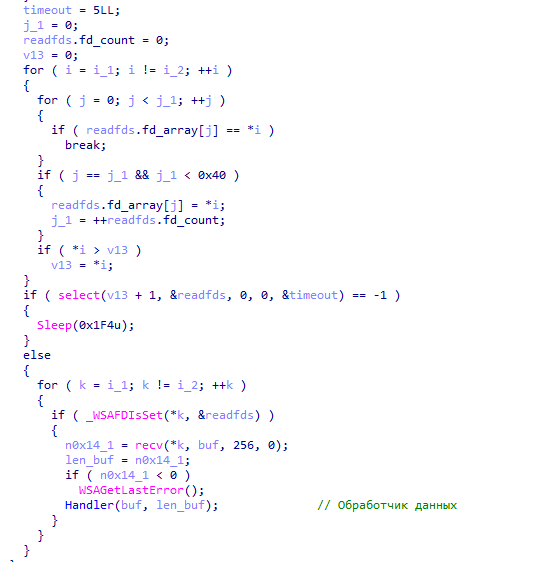
Figure 1. Reading 256 bytes of IP packet data
The Handler function filters captured IP packets and performs preliminary analysis:
- Verifies that the packet is a valid, unfragmented IPv4 packet no longer than 256 bytes.
- Identifies the protocol (ICMP, TCP, or UDP) and calculates the payload offset following the corresponding protocol header.
- Scans the payload for an 8-byte magic signature, calculated as the difference between two 64-bit values located 24 bytes apart.
- Discards previously processed packets by comparing the first 8 bytes of payload data with a signature stored in a global variable.
- When it identifies a new, unique packet, it passes a pointer to the matching location to HandlerPayload for further parsing.
The 8-byte magic signature had a different value in each DLL we discovered.
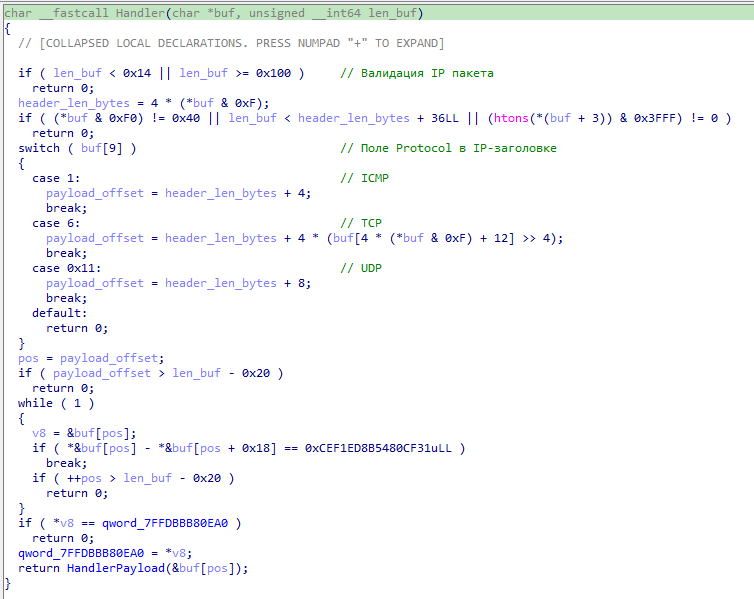
Figure 2. IP packet handler
The HandlerPayload function takes a pointer to the payload region of a captured IP packet, extracts configuration parameters, and passes them to SettingSocket.
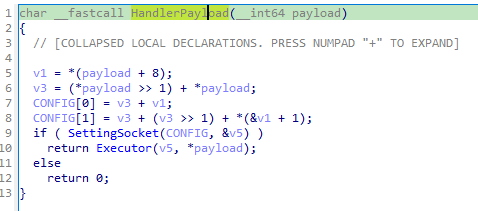
Figure 3. Payload handler
The first 8 bytes of data are used to deobfuscate the next 16 bytes, which contain the socket configuration.
| Offset relative to buf[pos] | Size (bytes) | Purpose |
|---|---|---|
| 0 | 8 | Configuration deobfuscation key, also used to calculate the magic signature |
| 8 | 16 | Obfuscated socket configuration |
| 24 | 8 | Used only to verify the magic signature |
The SettingSocket function takes a 16-byte structure containing the deobfuscated configuration, creates a TCP socket(AF_INET / SOCK_STREAM), and configures it according to the specified mode.
The mode is defined by a bitmask in byte 0:
- connect (bit 0): initiate a connection to the address and port specified in the configuration.
- listen, accept (bit 1): wait for an incoming connection, subject to a timeout.
- bind(bit 2): bind to a local address and port.
On success, the function stores the socket through the pointer a2 and returns 1; otherwise, it returns 0.
The configuration structure is shown in the table below.
| Offset | Size (bytes) | Field | Description |
|---|---|---|---|
| 0 | 1 | mode | Bit 0 = connect; bit 1 = listen, accept; bit 2 = bind |
| 1 | 1 | reserved | Unused |
| 2 | 1 | delay | Delay interval (delay × 100 ms) |
| 3 | 1 | timeout | select timeout: seconds = t / 10, microseconds = (t % 10) × 100,000 |
| 4–7 | 4 | conn_addr | IP address for connect mode |
| 8–9 | 2 | conn_port | Port for connect mode |
| 10–13 | 4 | bind_addr | IP address for bind mode |
| 14–15 | 2 | bind_port | Port for bind mode |
Once a connection is established using the modes described above, the malware receives a payload, decrypts it using AES-256 in CBC mode, and executes it in the process's memory.
TediousLoader follows a classic network-triggered malware design: a specially crafted network packet activates the malware and supplies an encrypted configuration and parameters for loading and executing arbitrary code.
CunningDoor
The attackers used DLL sideloading to execute the next malicious component. They placed four files on the compromised host: a legitimate DLL digitally signed by SafeNet, a malicious DLL loader, and two additional files.
In the first case, they used the legitimate DLL IKEYUI64.dll to load the malicious library iKeyAPI.dll by running the command rundll32.exe IKEYUI64.dll,ikeyUI_DlgSelectDeviceA.
The exported ikeyUI_DlgSelectDeviceA function called three functions exported by iKeyAPI.dll in sequence: ikey_CreateContext, ikey_OpenDevice, and ikey_DeleteContext.
The iKeyAPI.dll library decrypted the shellcode stored in C:\Windows\Temp\oluivzdz through three successive XOR operations. The first key was hardcoded in iKeyAPI.dll, the second was stored in C:\Windows\Temp\sqlslzgqpukrpd, and the third consisted of the first 32 bytes of oluivzdz.
Execution then passed to the decrypted shellcode, which dynamically resolved the addresses of the required Windows API functions by hashing their names with a modified FNV-1a algorithm.
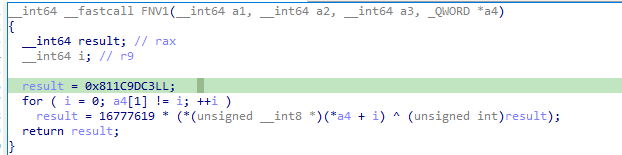
Figure 4. Function name hashing algorithm
After resolving the required function addresses, the shellcode decrypted a configuration containing the C2 server address. The example below shows a named pipe name and a security descriptor in Security Descriptor Definition Language (SDDL) format.

Figure 5. CunningDoor configuration
The malicious shellcode then listened on the named pipe it had created and waited for a payload. The data format was as follows:
- 16 bytes: initialization vector (IV) for AES-256-CBC
- 16 bytes: MD5 hash of the payload
- 4 bytes: payload length
- Payload: shellcode
The payload decryption key was hardcoded in the shellcode.
In all identified CunningDoor DLLs that used this method of C2 communication, the named pipe name followed the pattern \.\pipe[a-z]+.[a-f0-9]{8}.
In another case, the attackers placed the legitimate, SafeNet-signed library eToken.dll on the host to load the malicious DLPReel.dll. All of the malicious logic was implemented in the exported REEL_Initialize function.
This DLL provided the same functionality: it decrypted the shellcode and transferred execution to it. The difference was in the configuration, which specified an IP address and port.
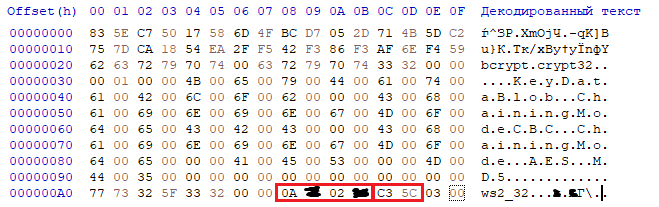
Figure 6. Configuration specifying C2 server IP address
SilentCOM
This malware family was identified in two DLLs: netcfgprox.dll, which hijacked the Network Configuration COM component, and netprogmprox.dll, which hijacked the Network List Manager COM component. Both DLLs acted as COM servers and exported the standard functions DllCanUnloadNow, DllGetClassObject, DllRegisterServer, and DllUnregisterServer.
All malicious code was implemented in DllGetClassObject. Before executing this code, however, the malicious DLL acting as the replacement COM object had to correctly handle requests intended for the original system component. Otherwise, disruptions to networking or system services could expose the attacker's presence. To prevent this, the malicious library used COM proxying as follows:
- It first queried the CLSID\{hijacked COM class identifier}\InProcServer32 registry key to obtain the path to the legitimate library implementing the target COM object. The malicious DLL read this path and dynamically loaded the original library into the host process's address space.
- After successfully loading the legitimate DLL, such as netprofm.dll, the malicious library resolved the addresses of its exported COM functions. The key function was DllGetClassObject, which provided the class factory for the requested COM class.
- When the system made a COM activation request for Network List Manager or Network Configuration, the malicious library checked the supplied parameters and forwarded the call to the legitimate library's DllGetClassObject, passing the same arguments: the class identifier (CLSID), the interface identifier (IID), and a pointer to receive the requested interface pointer.
After resolving the addresses of the legitimate library's exported functions, the malware checked its execution context. The process command line had to match svchost.exe -k netsvcs; otherwise, the process was forcibly terminated.
The malware then decrypted the DLL's configuration, which contained a named pipe name, such as \\.\pipe\04120e81-9a1a-4aca-97fb-a40da6acd500, and a security descriptor in Security Descriptor Definition Language (SDDL) format: D:(A;;GA;;;WD)S:(ML;;;;;S-1-16-0). In all identified DLLs, the Windows named pipe created by the malware followed the naming pattern \\.\pipe\[a-f0-9]{8}-[a-f0-9]{4}-[a-f0-9]{4}-[a-f0-9]{4}-[a-f0-9]{12}.
The malicious COM object's primary task was to wait for a payload to arrive through the named pipe. The transmitted data had the following format:
- 16 bytes: initialization vector (IV) for AES-192-CBC decryption
- 3 bytes: shellcode length
- Payload
SilentCOM shellcode
During incident response, PT ESC IR specialists monitored network traffic, filtering for data transmitted over Windows named pipes. They focused on pipes whose names matched regular expressions associated with the SilentCOM loader and CunningDoor malware. This monitoring allowed them to capture a payload transfer and decrypt the shellcode.
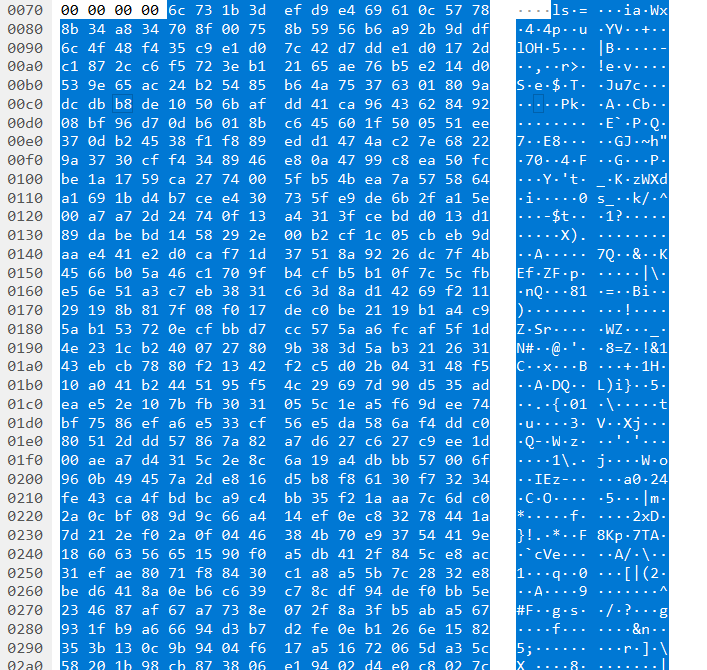
Figure 7. Shellcode sent through named pipe
The highlighted data in the figure above consists of a 16-byte initialization vector, a 3-byte payload length field, and the payload itself.
The shellcode contains a loader that decrypts the main payload and executes it within the current process. The loader uses direct system calls and native functions to bypass higher-level Windows APIs: NtAllocateVirtualMemory to allocate memory, LdrLoadDll to load libraries, LdrGetProcedureAddress to resolve function addresses, NtProtectVirtualMemory to change memory protection settings, LdrUnloadDll to unload libraries, and NtFreeVirtualMemory to release allocated memory.
Execution then passes to shellcode whose primary task is to perform a session key exchange and receive the next-stage payload. Communication takes place over the same named pipe used by the initial DLL loader.
Session key generation consists of two stages. First, two 32-byte values, x_key and y_key, are generated to serve as the agent's private keys. The session key exchange uses elliptic-curve Diffie-Hellman (ECDH) over Curve25519 with a base point of 9.
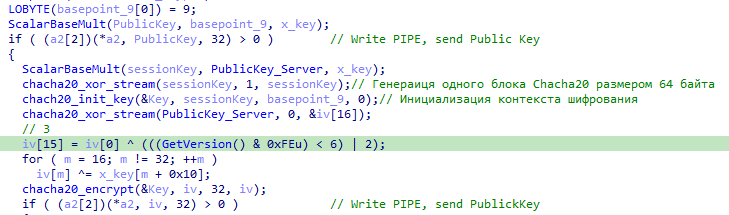
Figure 8. Shared session key generation for ChaCha20
The session key is generated as follows:
- The client's public key is calculated as G × x_key and sent through the named pipe.
- The session key is calculated as PublicKey_Server × x_key. The server's public key is hardcoded. In one sample, its value was DD 2B 6E 28 27 12 50 2D 3C 36 B6 FE C8 B2 B9 56 1B C9 CE A9 45 86 80 3C 88 9E C9 21 4B CF AC 06. The server's public key differed across the identified payloads.
- A single 64-byte ChaCha20 block is generated. The first and last 16 bytes of the ChaCha20 state are extracted from this block.
- The data obtained in the previous step is used to construct a ChaCha20 encryption context. The key in this context is then used to encrypt traffic between the client and server over the named pipe. The constants used to initialize the ChaCha20 context are modified to the following byte sequence: 71 20 2F 78 48 3F D9 14 48 B0 13 DA 02 32 46 88.
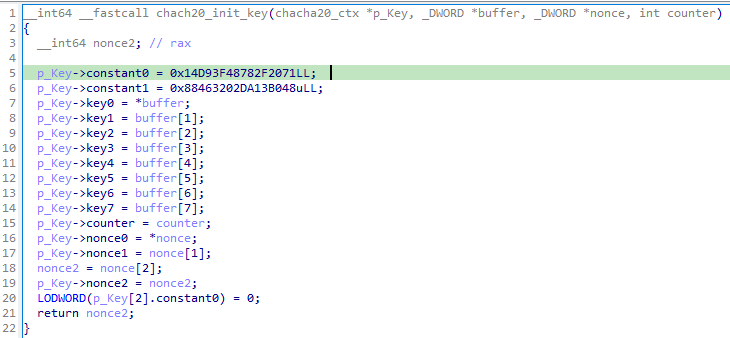
Figure 9. ChaCha20 key initialization
After successfully generating the session key, the agent waits to receive 128 bytes of data from the C2 server. Once this data arrives, the second stage of session key generation begins, producing the primary key for subsequent communication between the agent and the C2 server.
The data received from the C2 server during subsequent communication constitutes a post-exploitation payload.
The modified constant used in the ChaCha20 key generation context, 71 20 2F 78 48 3F D9 14 48 B0 13 DA 02 32 46 88, is a key indicator for detecting this payload solely in Windows process memory.
HenMapCaCon
The HenMapCaCon.dll dynamic-link library was written in Go and compiled with Go 1.18–1.19. It was built using cgo to provide compatibility with C interfaces. To hinder analysis, Go function names were stripped from the pclntab structure. Building DLLs from Go code is relatively uncommon.
The main malicious code is implemented in the exported StoreMini function, which uses the go-winio library to create a TLS server over a named pipe. During execution, it creates the pipe \\.\PIPE\ProProBitOpen with the SDDL security descriptor D:NO_ACCESS_CONTROLS:(ML;;;;; S-1-16-0), which is the default security setting in go-winio. This string sets a mandatory integrity level that denies access to the pipe to processes with an Untrusted integrity level (S-1-16-0), while allowing all other processes with higher privileges (Low, Medium, High, and System) to communicate through it.
When a request is made to the /qr route with an s parameter containing the data to encode, the server returns an HTML page for a simple QR code generator. The page displays a QR code image generated by the external Google Chart API service (chart.apis.google.com), along with the encoded string in plain text. A form on the page accepts up to 1,024 characters and submits a GET request to the root path, /.
<title>QR Link Generator</title>
</head>
<body>
{{if .}}
<img src="http://chart.apis.google.com/chart?chs=300x300&cht=qr&choe=UTF-8&chl={{.}}" />
<br>
{{.}}
<br>
<br>
{{end}}
<form action="/" name=f method="GET">
<input maxLength=1024 size=70 name=s value="" title="Text to QR Encode">
<input type=submit value="Show QR" name=qr>
</form>
</body>
</html>
Of particular interest is the /fetch endpoint, which is designed to exfiltrate files from the compromised system. It accepts two parameters: key, a key value used to validate the request, and path, the full path to the requested file. The analyzed sample uses the key value qzYMRSSTiWXZzuZxsSjlKiuXJCaNrsZVyZAYAKvCchfBzgpLSSZjEr.
Conclusion
StingyBasilisk was one of the most sophisticated threats we encountered in early 2026. To establish persistence, the attackers used COM hijacking to replace the legitimate Network List Manager and Network Configuration components. The malicious DLLs supported COM proxying to keep system services running reliably. The attackers also used the Time Providers mechanism for persistence.
Windows named pipes were used extensively for command and control. This allowed the attackers to build a multistage chain of compromised hosts that communicated through these pipes. Their toolkit also included a backdoor that inspected network traffic on an infected host to extract payloads.
This architecture helped the attackers remain undetected and penetrate isolated network segments, bypassing traditional perimeter defenses.